987
tasks completed
this quarter!
this quarter!
Crafting digital experiences that drive impact at scale
Improved the trip trading experience for pilots
Personalized the Account Summary section
Reimagined AI experience for financial services
Gamified savings experience
Current projects in development. Check back soon for updates.
United Airlines’ WebCargo service is a digital cargo booking and management platform that enables freight forwarders and shippers to instantly search capacity, price, book, and manage air cargo shipments across United’s global network.
United’s Network Planning team developed a new internal application that allows planners to model, evaluate, and optimize flight schedules end-to-end in a single, unified workspace instead of across fragmented tools.
I'm a UX designer with 10+ years of experience creating user-centered digital products. My approach combines deep user research, iterative design thinking, and close collaboration with development teams.
I believe great design is invisible—it solves problems so elegantly that users don't even notice it's there. My work has helped companies increase user engagement by up to 200% and reduce support tickets by 45%.
UI design, design systems, interaction design, high-fidelity prototypes
Strategy, interviews, surveys, usability testing, storytelling
Wireframes, prototypes, user flows
Figma, Sketch, Miro, ChatGPT, Claude

Understanding users, business goals, and technical constraints through research and stakeholder interviews.
Synthesizing insights to identify core problems and opportunities, creating user personas and journey maps.
Iterating through sketches, wireframes, and high-fidelity prototypes based on user feedback.
Collaborating with developers, conducting usability tests, and refining based on real-world usage.
Have a project in mind? I'd love to hear about it.
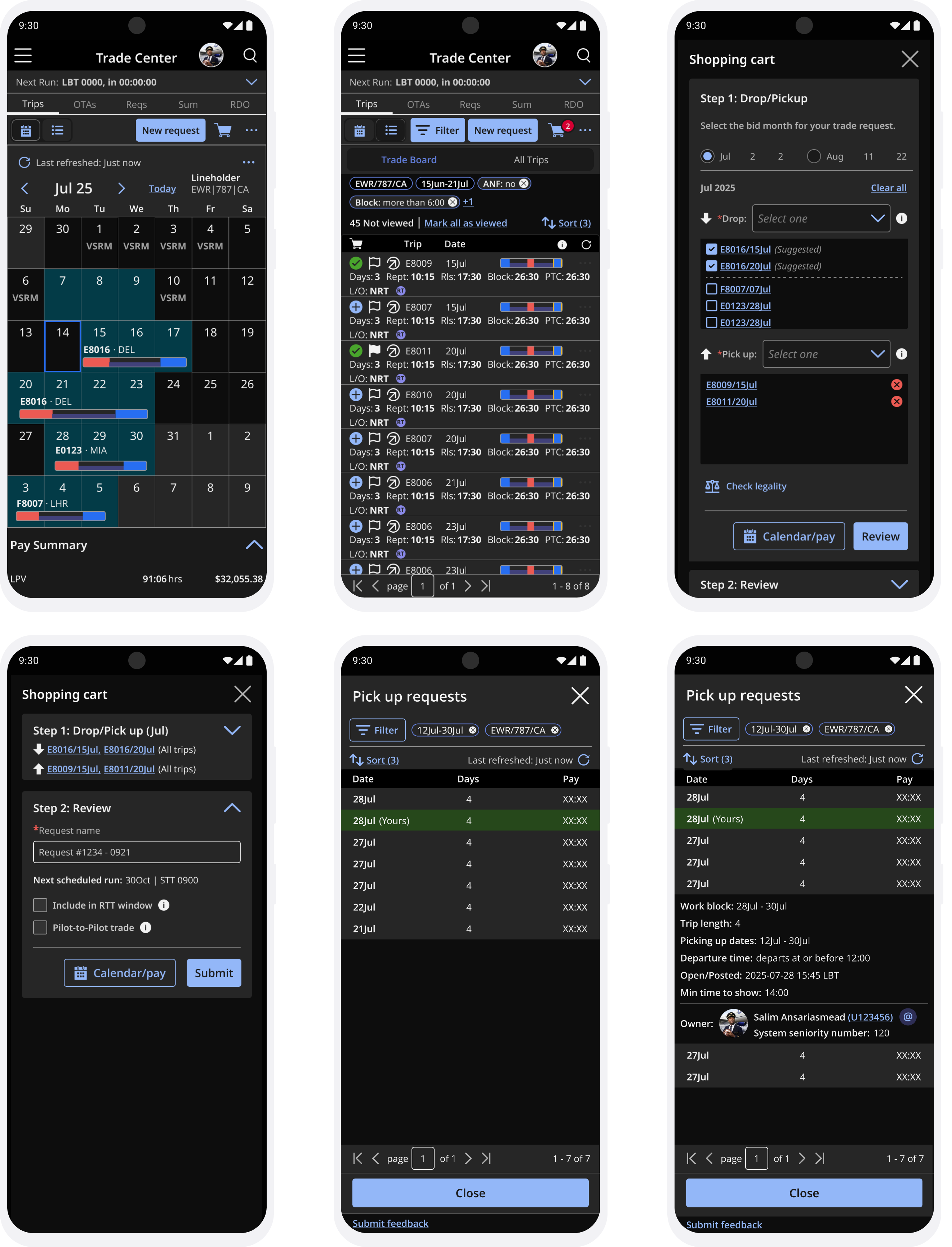
Get In TouchUnited Airline's crew scheduling system was functional but rigid, making it difficult for pilots to trade trips efficiently. The “Trip Trade” initiative aimed to create an internal marketplace where pilots could view, request, and swap flight assignments with real-time scheduling updates and union compliance — all in one seamless experience.
To tackle these challenges, I collaborated closely with 1 UX Lead, 2 UX researchers, product managers, developers, and union representatives. We adopted a user-centered design approach, conducting extensive research with over 40 pilots through interviews, surveys, and usability testing.
Stakeholder interviews and competitive analysis uncovered pain points and mapped the pilot trip trade journey. User testing highlighted the need for real-time availability, clear trade statuses, and mobile access. Key insights included:
We envisioned a mobile-first app that served as a centralized hub for trip trading—inspired by Amazon's checkout process because of the ubiquitous nature of its user experience. Key features included a dynamic marketplace, real-time notifications, AI-powered trade suggestions, and compliance automation to ensure all trades met regulatory and union standards.
Using a one week design sprint, we rapidly ideated and prototyped key flows. Low-fidelity wireframes were created to map out user journeys, followed by high-fidelity interactive prototypes in Figma. We prioritized features based on user feedback and technical feasibility, focusing on core functionalities like trip browsing, trade request conflicts, and notifications.
The following image is from our 30+ user testing sessions which were conducted in the flight training center in Denver Colorado.
The final design featured an intuitive interface with a clean layout, easy navigation, and clear trade statuses. Pilots could quickly browse available trips, filter by criteria, and request trades with just a few taps. Real-time notifications kept users informed of trade updates, while AI suggestions helped pilots find optimal matches based on their preferences and schedules.
Post-launch metrics showed a 300% increase in trip trades within the first three months. User satisfaction scores improved significantly, with pilots praising the app's ease of use and efficiency. The mobile-first design allowed pilots to manage trades on-the-go, leading to higher engagement and reduced scheduling conflicts. Overall, the Trip Trade app transformed United's crew scheduling process, making it more flexible, efficient, and user-friendly.
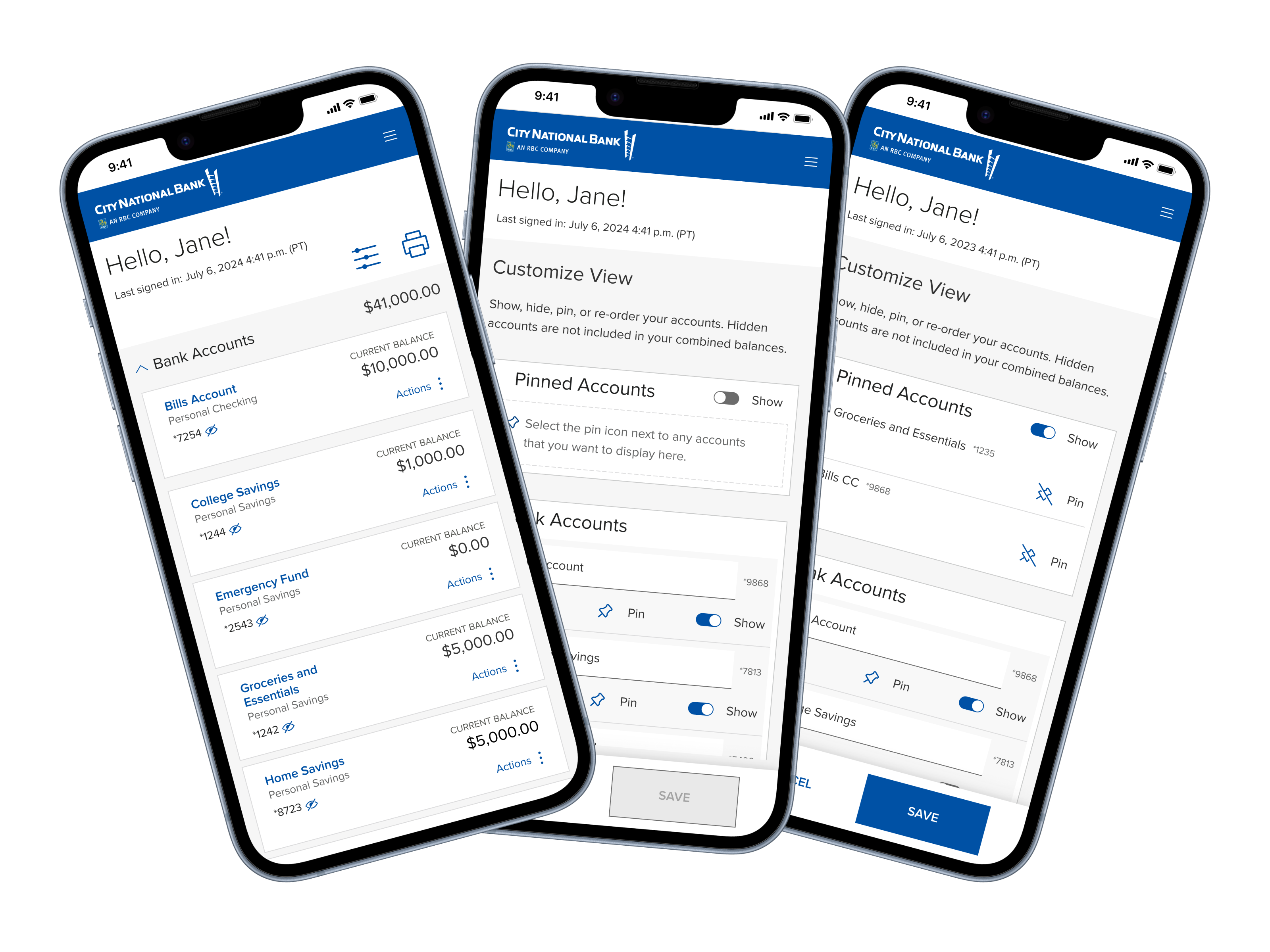
City National Bank's high-net-worth clients often manage 15–20+ accounts across personal, business, and trust holdings. The legacy Account Summary presented these in a flat, unorganized list, creating cognitive overload, navigation friction, and no way to personalize the experience.
I led the redesign of the Account Summary, introducing pinning, hiding, reordering, grouping, and renaming—validated through competitor audits, concept testing, and multi-round usability studies.
Outcome: 43% faster navigation, +9 NPS lift, and significant increase in perceived control & satisfaction.
HNW clients needed a clearer, more intuitive way to organize their portfolios. The previous design made it difficult to quickly locate priority accounts, reduce clutter from lesser-used or seasonal accounts, and create a mental model aligned with how they manage wealth across entities.
The challenge: Deliver a flexible, user-controlled information architecture without compromising clarity, compliance, or cross-platform scalability.
Project Goal: Create an intuitive Account Summary that helps clients find their most important account information quickly and confidently.
Research Goal: Understand user expectations for customization and evaluate the usability of proposed interactions across web and mobile.
Weeks 1–4 — Design Exploration + Research Planning: Competitive analysis, design ideation, interaction models, hypothesis framing
Weeks 5–8 —Concept Testing with CNB Clients: Moderated interviews to validate mental models and evaluate early prototypes
Weeks 9–12 — Iteration, Coded Prototyping & Usability Testing: Partnered with Design System team to build coded prototypes and run unmoderated task-based tests; finalized responsive designs

Manages 20+ accounts spanning personal, trust, and business entities.
This persona guided personalization scenarios and prioritization logic.
1. Secondary Research — Competitor Audit
Date: May 29, 2024
Platforms Reviewed: 7 major banking & fintech competitors
Goal: Understand leading patterns for personalization, grouping, and multi-account organization
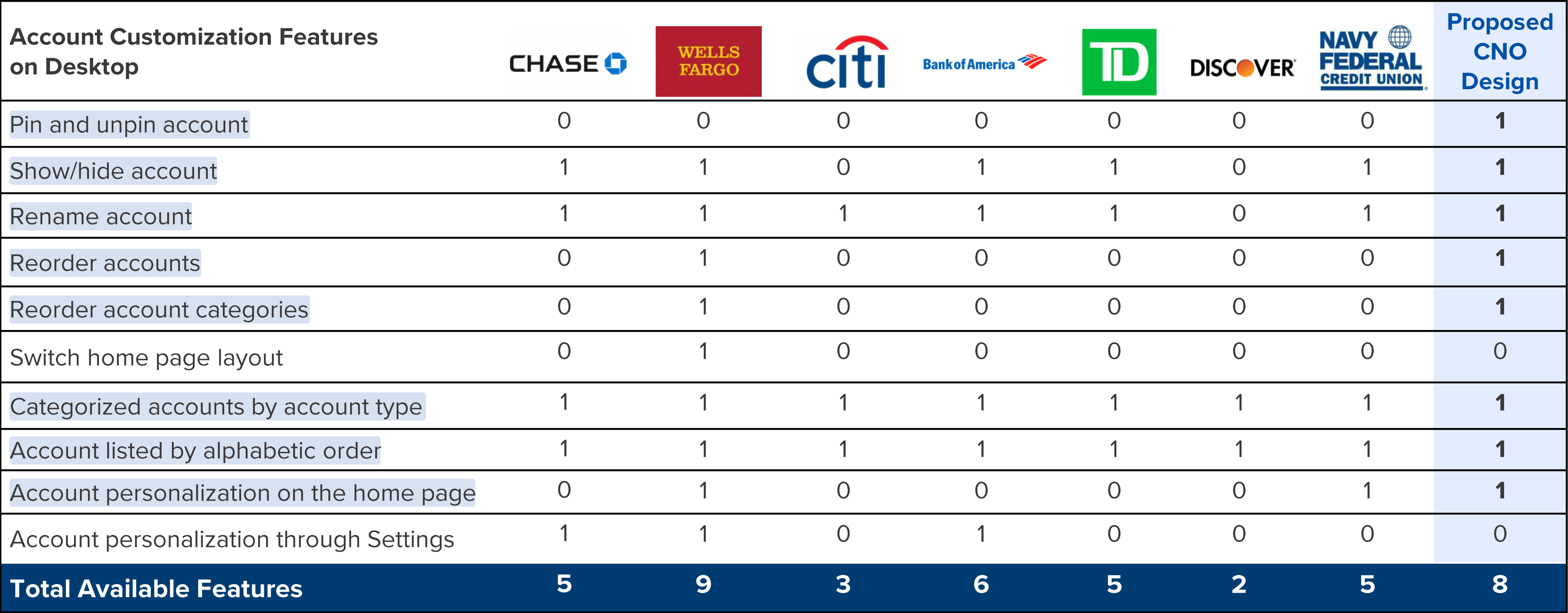
Highlighted features are available in the final CNO Account Customization design.
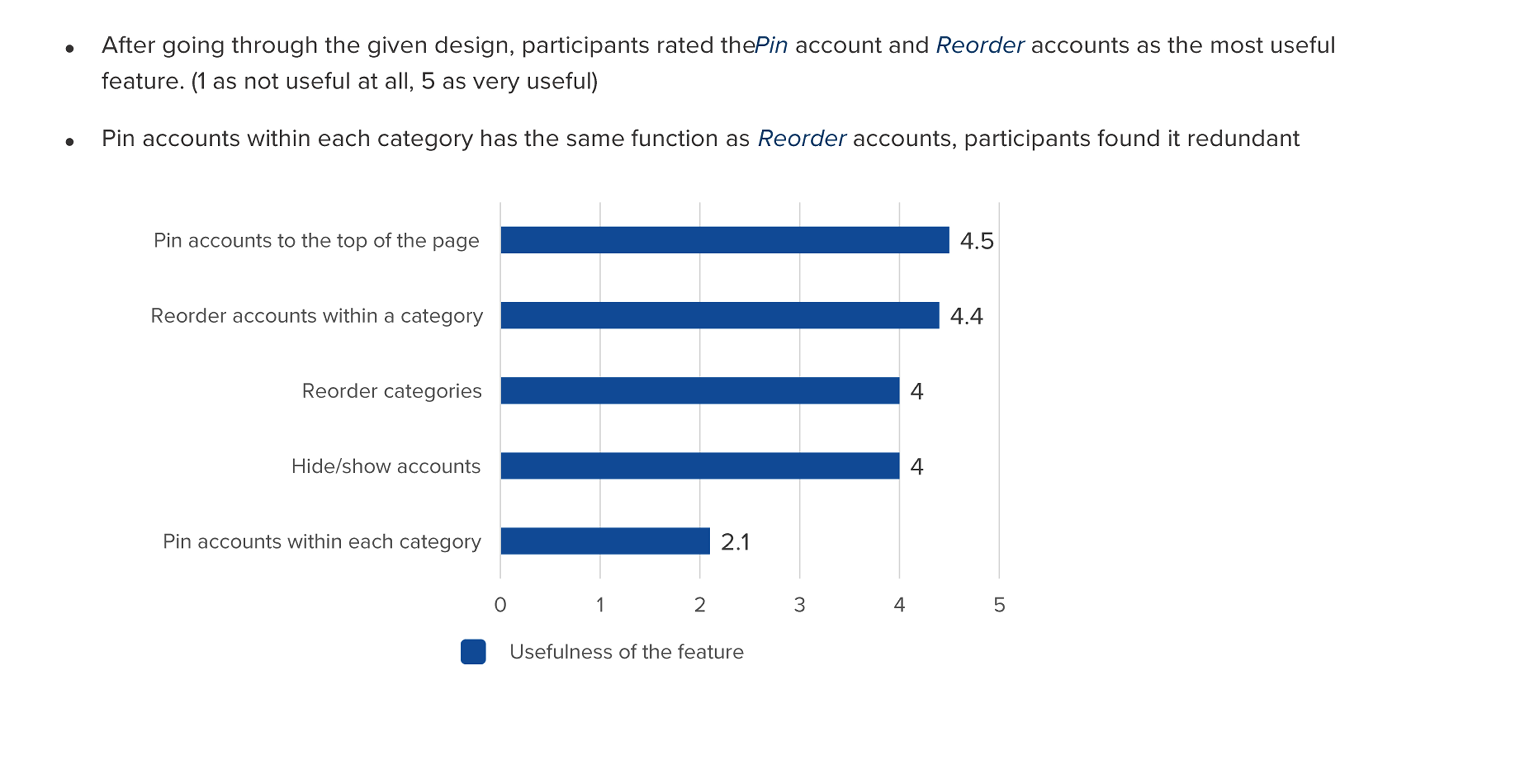
2. Concept Testing — Moderated Interviews
Dates: June 25–28, 2024
Participants: 8 CNB clients with 20+ accounts
Goal: Test early customization models (pinning, grouping, renaming) and validate mental models
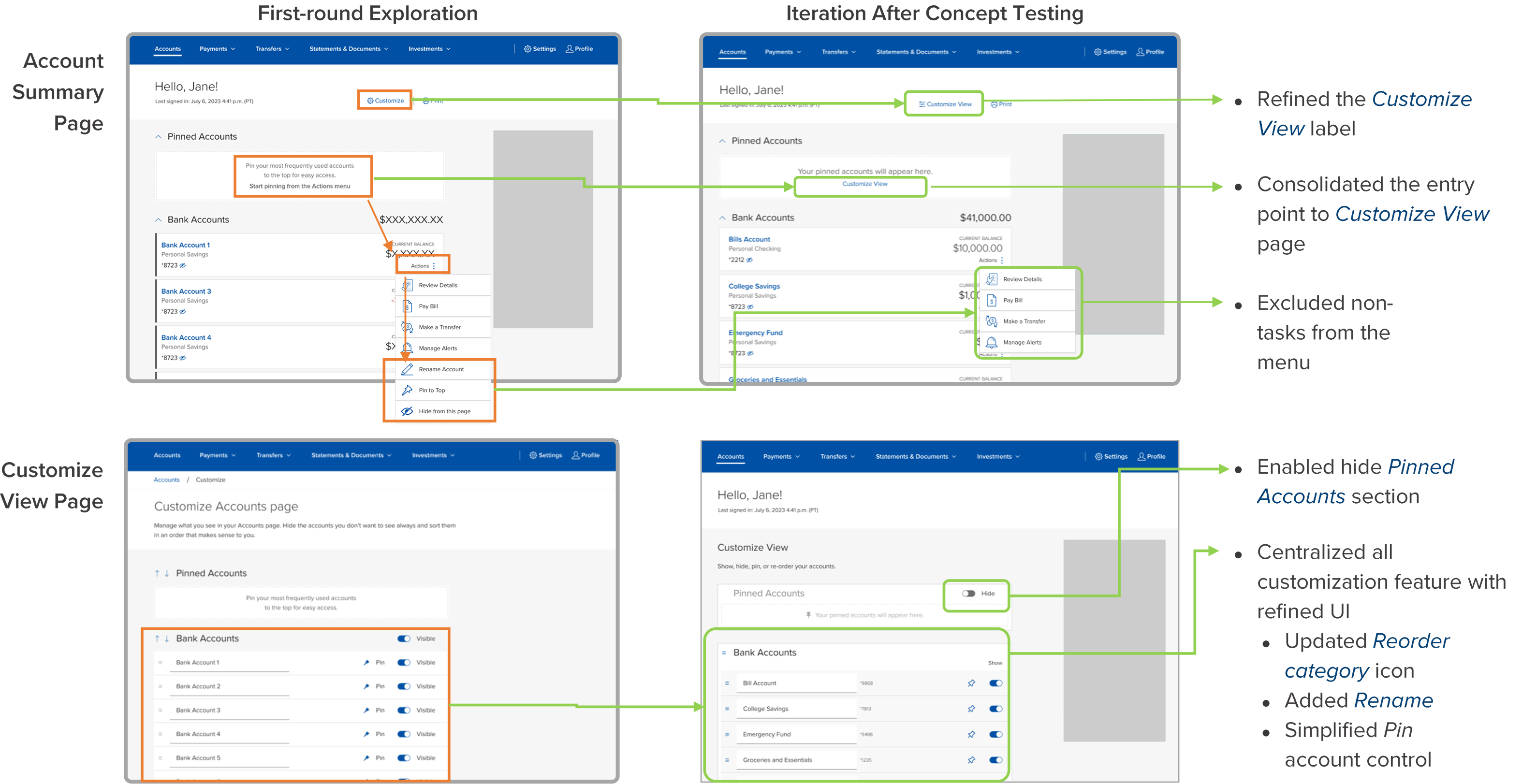
3. Unmoderated Task-Based Usability Testing
Dates: July 31–August 2, 2024
Participants: 25 digital clients with 15+ accounts
Goal: Evaluate ability to pin/unpin, hide/reveal, reorder, and interpret combined balance rules
Results directly shaped micro-interactions and responsive patterns.
The final design introduced a flexible, user-controlled system that allowed clients to customize their Account Summary view. Key features included pinning priority accounts to the top, hiding seasonal or infrequent accounts, custom reordering via drag-and-drop, grouping accounts by entity or purpose, and renaming accounts for clarity.
High-fidelity prototypes were developed for both web and mobile platforms, ensuring a consistent experience across devices while respecting the unique constraints and opportunities of each platform.
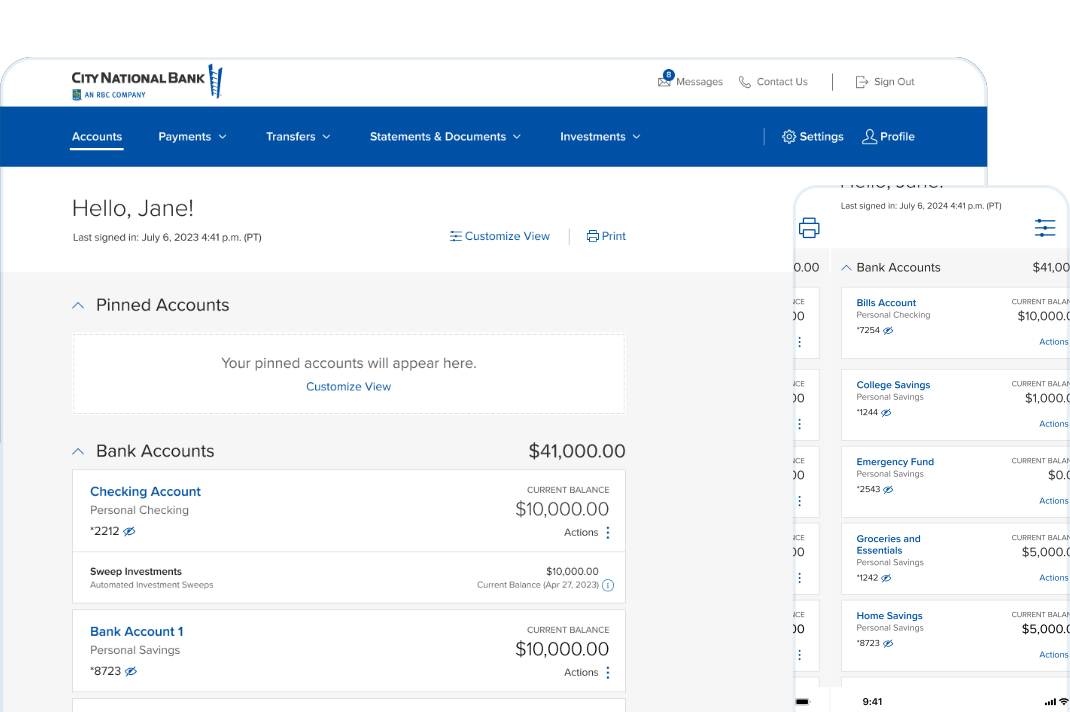
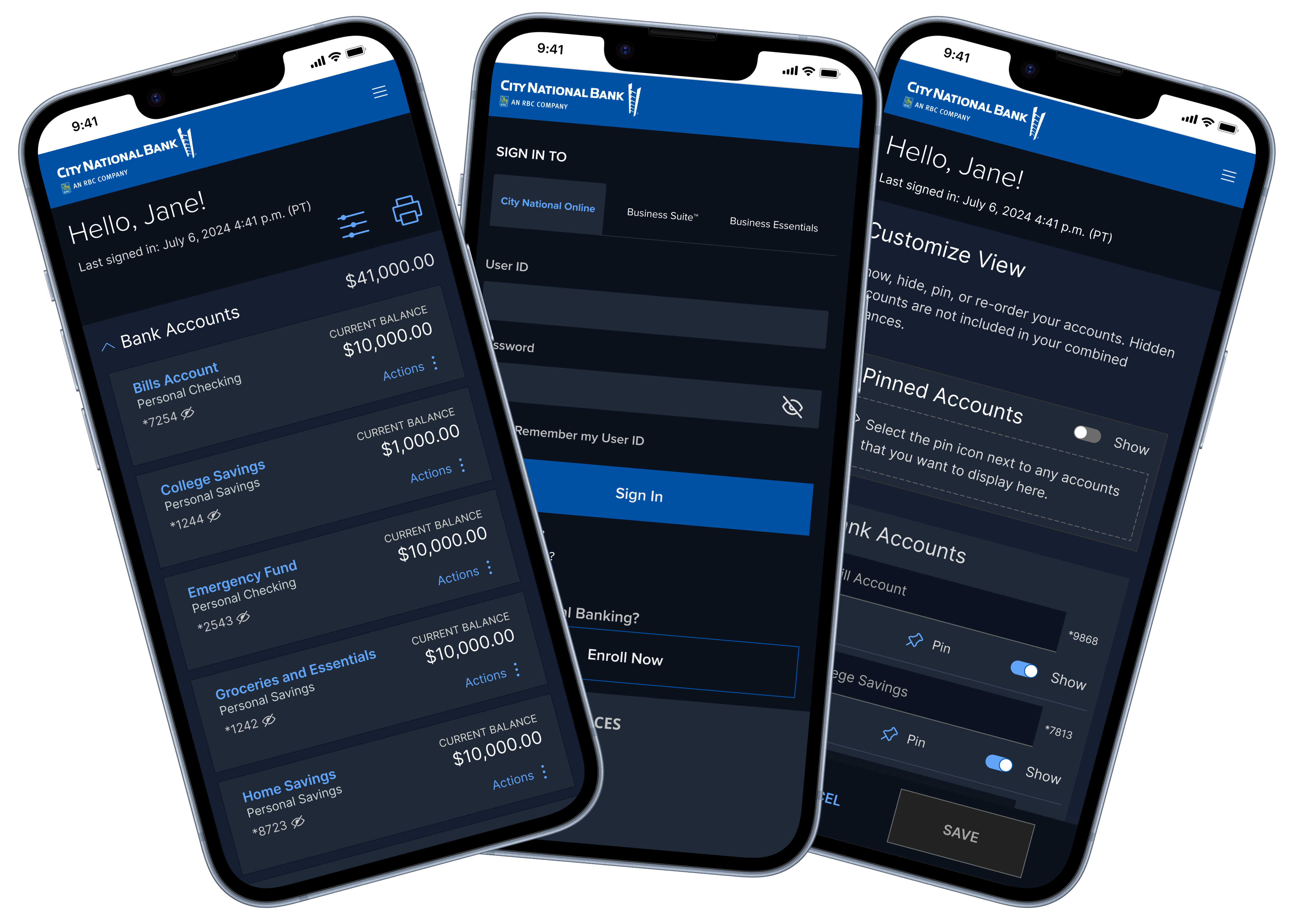
Measurable Outcomes:
• 43% reduction in time to find a target account
• +9 increase in NPS for digital experience
• Higher completion rates for customization tasks
• Increased confidence navigating complex multi-entity portfolios
I partnered closely with UX Research for moderated and unmoderated studies, worked with the Design System team to build coded prototypes for richer, realistic testing, and coordinated with Product & Engineering to align on feasibility, governance, and rollout strategy. We leveraged design tokens and responsive rules for cross-platform scalability.
Two rounds of research—concept testing and usability testing—ensured that we both built the right thing and built it right. Using coded prototypes generated far more accurate behavioral insights than static Figma prototypes. Cross-disciplinary alignment early (Design System + Engineering) allowed smoother handoff and accelerated adoption into the Roxbury Design System.
• Personalization is critical for high-net-worth portfolio management
• Small interaction details (drag-handles, animations, tooltips) influenced task success significantly
• Clients strongly valued feeling "in control" of their financial landscape
• This redesign established the foundation for future personalization features across CNB's digital suite
As UX Lead for Research & Design, I led a forward-looking product vision initiative for EY's Global Tax Platform (GTP). This "concept car" project explored what GTP could become if we removed current technical constraints and design-system limitations—prioritizing clarity, personalization, and intelligent automation over incremental improvements.
Over 4 sprints, we partnered with Product Management to create a future-state vision that addressed systemic workflow pain points for both EY professionals and client users. While conceptual, this work directly influenced roadmap discussions and future feature development.
• Reduced cognitive load by simplifying navigation and surfacing "what matters now"
• Increased engagement efficiency by reducing context switching across tools
• Enhanced adoption readiness through guided onboarding and in-product assistance
• Established a north-star UX model used to evaluate future GTP investments
GTP supports complex, global tax engagements—but research revealed that the experience had become fragmented across workflows and external tools, difficult to navigate for both internal EY users and clients, under-personalized forcing users into generic experiences, and manual and inefficient especially during peak tax season.
Product Management asked the UX team to step back from requirements and explore a more fundamental question: If we were designing GTP today—with no legacy constraints—what should it be?
Engagement teams configure client parameters, select applicable tax services, and define deliverable requirements.
Clients and internal teams upload financial documents, transaction records, and supporting materials across multiple jurisdictions.
Tax professionals analyze data, calculate obligations, prepare returns, and coordinate reviews across service lines and countries.
Final deliverables are approved, filed with tax authorities, and comprehensive reports are generated for client records.
• Create a user-friendly, visually cohesive platform
• Enable personalization by role, engagement, and region
• Surface critical work and insights at the right time
• Explore how AI and automation could meaningfully reduce effort
• Provide a clear vision to guide long-term product strategy
Strategic Discovery & Personas: We partnered with PMs, engagement managers, and tax professionals to understand platform-level challenges across regions and services.
Primary Personas:
The EY Engagement Manager primarily focuses on the timely delivery of artifacts for entities in a specific country and/or region.
Typically will work in some way with EY teams in country, centrally managed and in other countries (for scope and fee to deliver the work). They are usually only associated with either one client and/or one (or two) client(s).
The Client Filer or Data Provider focuses on providing deliverables for a tax filing — these include quarterly or monthly trial balances.
Responsible for providing documents to EY, as agreed upon, as part of the engagement process.
We analyzed enterprise SaaS platforms beyond tax to identify modern patterns in personalized dashboards, task-first navigation, embedded collaboration, and AI-assisted workflows.
Key Insight: Users don't want more features — they want better orchestration of the work they already do.
Using Miro, we translated research themes into opportunity areas and rapidly explored concepts such as personalized navigation and task-centric dashboards, embedded collaboration and communication, automation via AI-driven assistance, and platform rebranding to signal a modern, intelligent system.
Ideation Impact (Projected):
• Reduced time to locate key tasks by surfacing work contextually
• Decreased tool switching by consolidating workflows in one workspace
• Increased user confidence through clearer system feedback and guidance
Synthesized findings from 40+ stakeholder interviews, user sessions, and behavioral analytics
Personalized Workspace: A customizable workspace surfaces upcoming tasks and deliverables, engagement-specific insights, and curated tax news relevant to country and service.
Modern Onboarding & In-Product Guidance: We designed a three-step onboarding flow where users configure their workspace by engagement. WalkMe-style guidance then introduces new features contextually.
Navigation & Global Filters: A reimagined navigation model prioritizes active work, supported by global filters that allow users to pivot without losing context.
Contacts & Collaboration: Contacts were redesigned to integrate directly with Microsoft Teams, enabling seamless communication between clients and engagement teams from within GTP.
Excel-Native Deliverables: We explored embedding Excel directly into the Deliverables workspace, eliminating the need for repetitive downloading and uploading.
To support EY professionals working remotely or on-the-go, we designed mobile concepts that prioritized quick access to critical tasks, notifications, and communication tools.
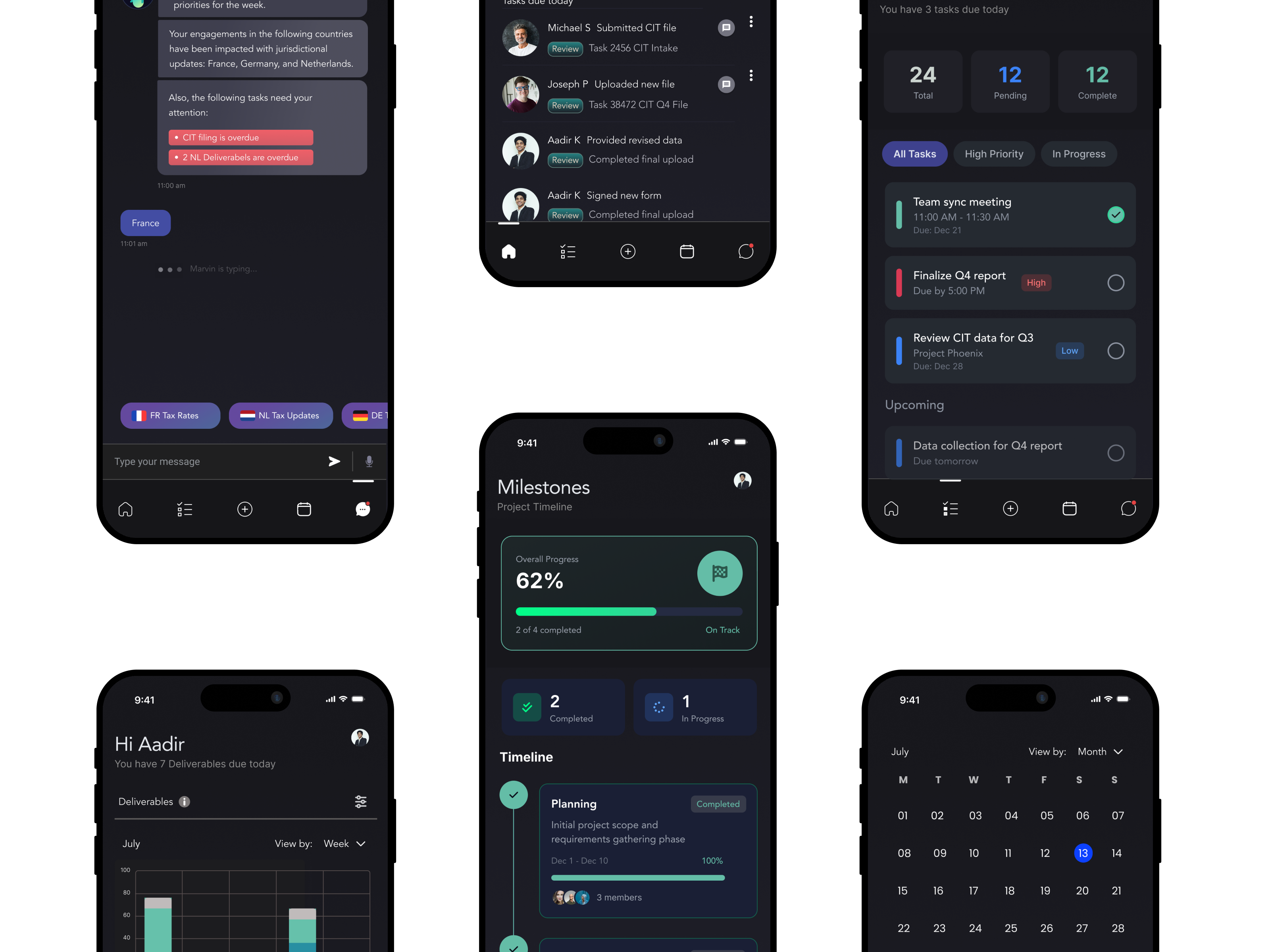
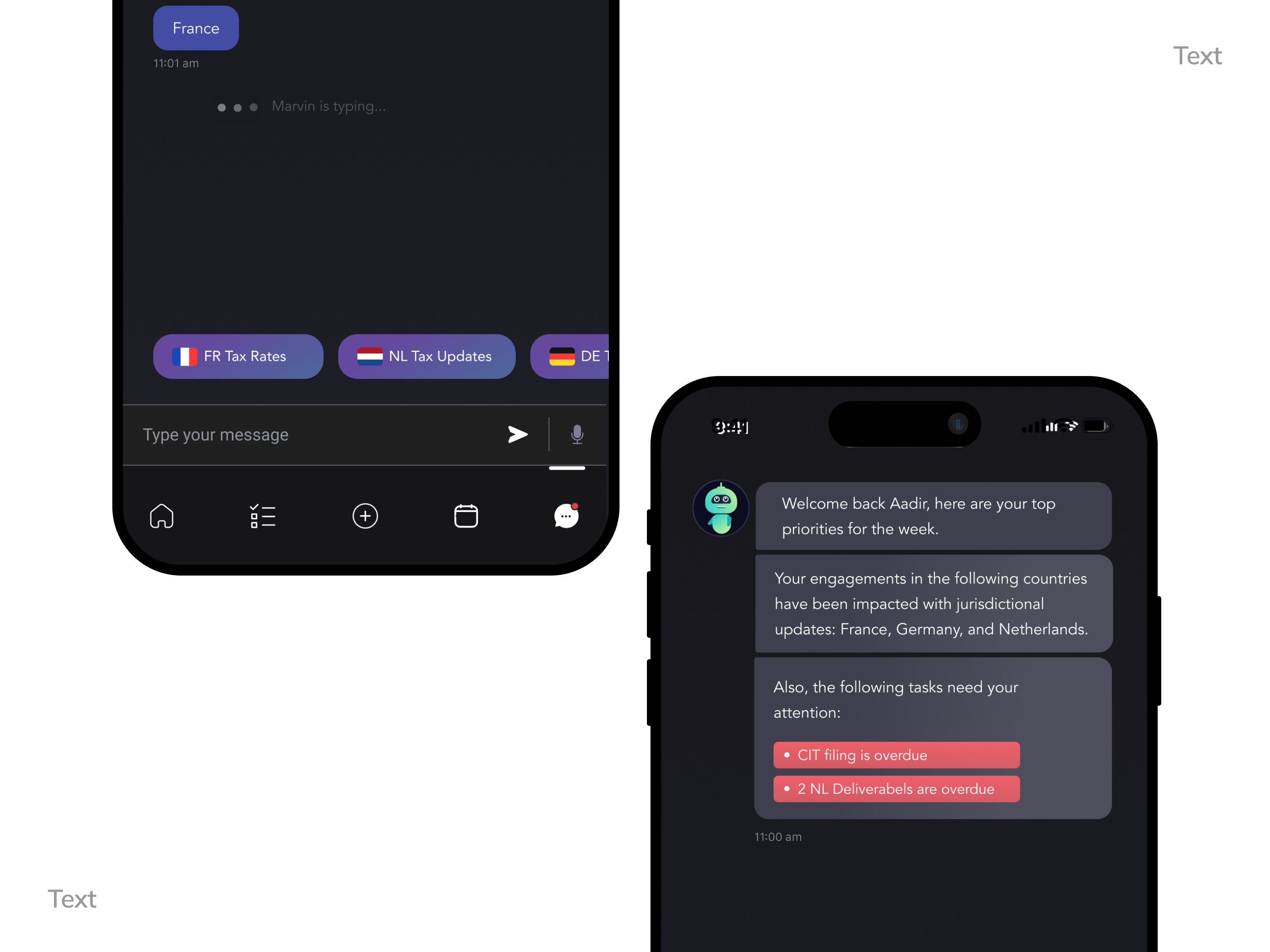
We extended an existing ServiceNow Virtual Agent initiative by envisioning Marvin, an AI assistant with natural language conversations, contextual awareness of engagements and regions, memory of prior interactions, and ML-driven recommendations.
Projected Impact: Reduced time spent searching for answers, increased decision confidence, and AI positioned as a workflow partner, not just support.
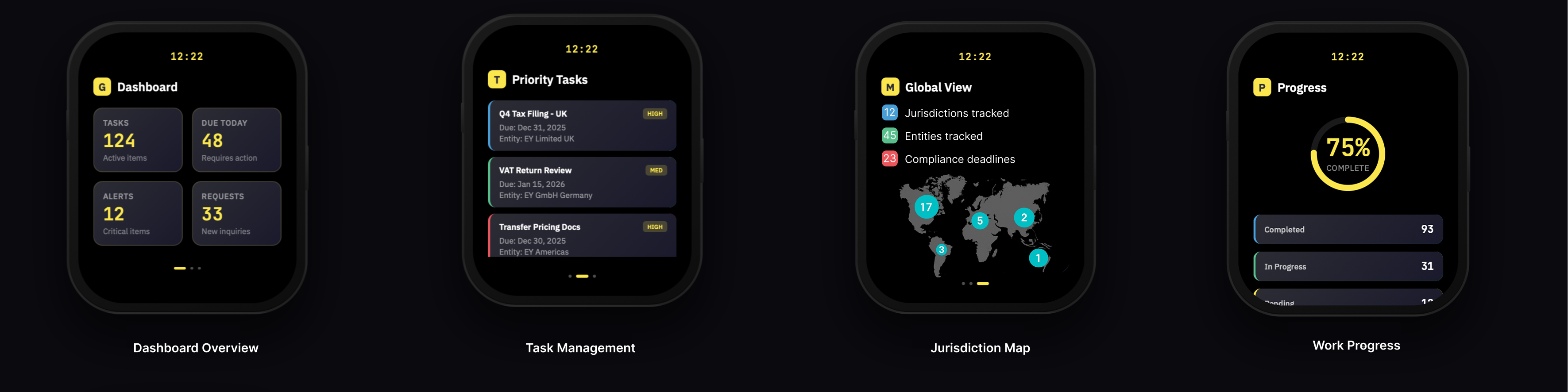
As a future-facing concept, we explored gamification tied to EY's existing Bravo Awards, automatically rewarding completed filings and milestones to increase motivation during peak tax season and reinforce positive behaviors.
Wearable notifications and progress tracking to motivate tax professionals during peak season
Achievement Celebration
Milestone notifications celebrate quarterly progress and encourage continued engagement
Daily Progress Tracker
Activity ring shows completion percentage and motivates users to hit daily filing targets
Streak & Team Leaderboard
Streak tracking and competitive rankings drive engagement during high-pressure filing periods
Platform-Level Impact:
• Influenced future GTP roadmap discussions
• Provided leadership with a clear UX north star
• Shifted conversations from feature requests to experience systems
• Validated the role of AI, personalization, and orchestration in enterprise tax platforms
Design Leadership Takeaway: Even as a conceptual initiative, this work demonstrated how vision-led design can align stakeholders, inspire teams, and materially shape long-term product direction.
SaveUp is a financial literacy app with a mission to help people build healthier money habits through gamification. By turning saving and debt reduction into a rewarding, game-like experience, SaveUp encouraged users to learn, take action, and stay engaged.
Working as the lead product designer, I reimagined the experience to address low engagement and improve the token-trading system that allowed users to earn prizes for positive financial behaviors. This project was particularly meaningful to me because it supported a good cause—helping people save money and feel more confident about their financial future.
Although users were intrigued by SaveUp's concept, engagement quickly dropped after onboarding. Financial literacy lessons felt dense and overwhelming, the token-trading flow used to redeem rewards was confusing and left users uncertain about how their actions tied to prizes, and messaging throughout the experience wasn't clear, making it difficult for users to understand why certain tasks or challenges mattered.
The business goal was to improve user retention and increase engagement with financial literacy content, while keeping the experience approachable and motivating.
I conducted user interviews to understand pain points and partnered closely with the product team to analyze behavioral data. This collaboration allowed us to identify specific drop-off points and measure where users were disengaging.
Key insights:
• Users wanted a clearer connection between their financial actions and rewards
• Many preferred bite-sized lessons over long-form content
• Messaging and microcopy needed to be simplified to explain both financial concepts and app mechanics in plain language
• Progress visualization was critical to sustaining motivation
My design approach focused on four pillars:
1. Redesigned Token Trading Flow
Simplified and clarified how tokens were earned and redeemed. Added visual cues and real-time feedback so users understood progress toward rewards. Made the process feel fun, intuitive, and rewarding.
2. Improved Messaging & Microcopy
Rewrote lessons, onboarding copy, and reward descriptions in clear, approachable language. Framed challenges around positive outcomes ("You're closer to your goal!") instead of tasks. Embedded contextual explanations of financial concepts directly into actions, reducing intimidation.
3. Goal-Oriented Onboarding
Introduced personal goal-setting (e.g., saving $500 or paying off $1,000 of debt). Tailored content and messaging to each user's financial literacy level.
4. Gamified Financial Education
Embedded micro-lessons directly into user actions (e.g., learning about APR when paying down credit cards). Created streaks, challenges, and badges to drive daily engagement.
5. Brand & Experience Consistency Improvements
I created a more cohesive, trustworthy, and polished digital experience across the app by aligning UI components, color usage, typography, and interaction patterns to a unified branding guide that I developed.
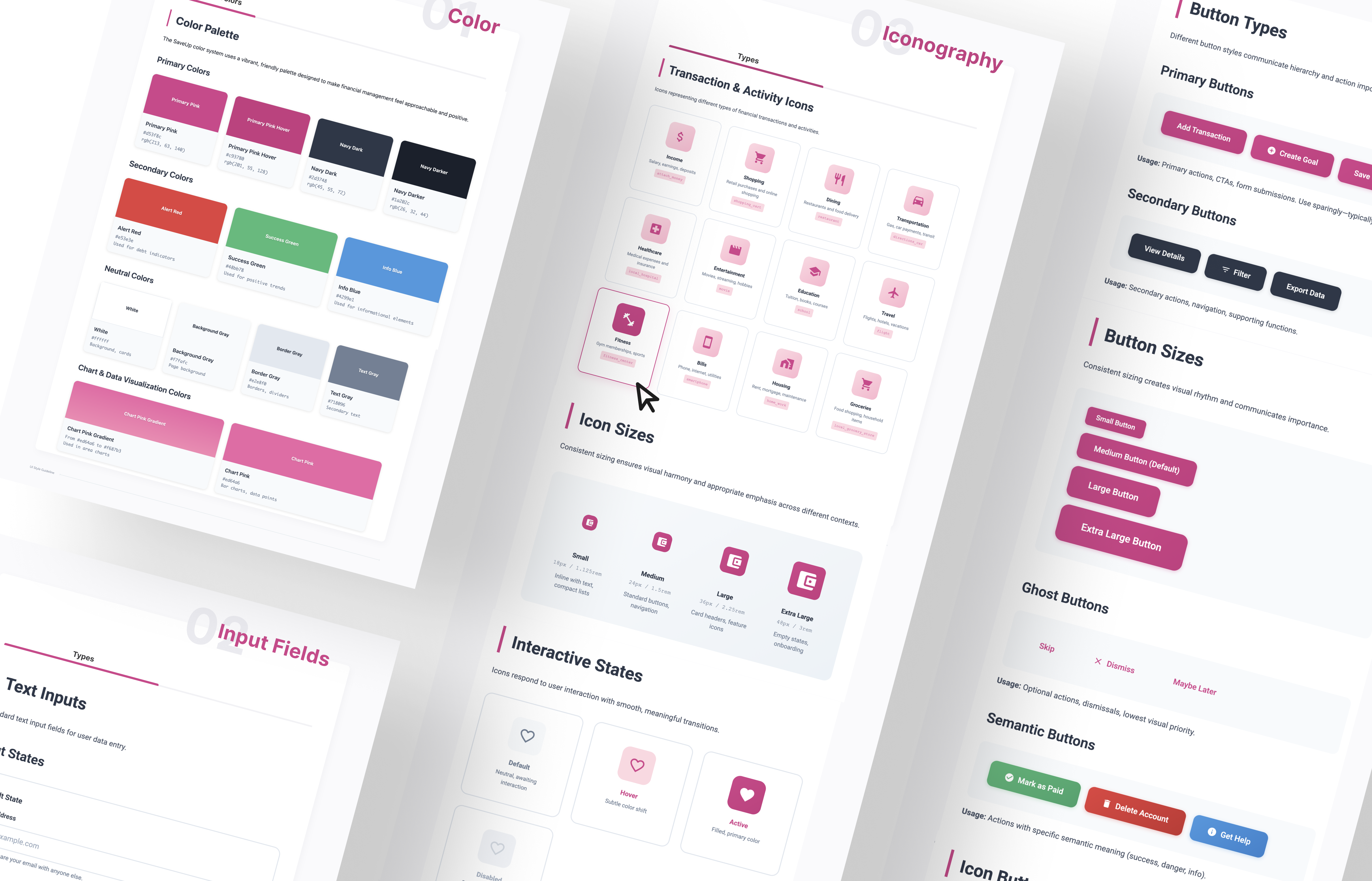
• Interactive Dashboard with progress bars and savings/debt "levels"
• Reward System with tokens, badges, and prize draws tied directly to financial actions
• Bite-Sized Lessons with supportive, simplified messaging
• Behavior Analytics Integration to continuously refine design decisions
The redesign drove measurable impact:
• 42% increase in daily active users within three months
• 35% jump in lesson completion rates, up from <10% previously
• 20% increase in recurring savings setup, indicating long-term behavior change
• Users described SaveUp as "fun," "motivating," and "less intimidating" than other financial apps
SaveUp reinforced for me that design can spark meaningful behavior change when empathy and motivation work hand in hand. By simplifying the token-trading flow, clarifying messaging, and leveraging analytics, we helped users feel in control of their money while enjoying the process.
This project was not only a design success—it was personally rewarding to contribute to an app that promoted financial wellness and helped people save money.
By combining user research, gamification, improved messaging, and close product collaboration, I transformed SaveUp into an engaging financial literacy platform that made saving money approachable, rewarding, and fun.
TaskMaster Pro is a project management tool designed for creative teams. The challenge was to create a powerful dashboard that displays complex data without overwhelming users.
The platform achieved 10,000+ active teams in the first 6 months. User productivity increased by 65%, and the intuitive dashboard reduced onboarding time from 2 hours to 15 minutes.
FitTrack is a comprehensive fitness app that integrates with wearable devices to provide personalized workout recommendations and health insights. The app uses machine learning to adapt coaching based on user progress.
Fitness apps often overwhelm users with too much data. Our challenge was to surface the right insights at the right time while keeping the daily experience simple and motivating.
FitTrack users showed 3x higher retention rates compared to competitors. The app received Apple's "App of the Day" feature and maintains a 4.9 star rating with over 1M downloads.